If you’re building a platform integration and you’ve been offered “an AI agent that can talk to your API,” you’ve probably learned to ask a follow-up question before getting excited: who wrote the query, and who’s going to keep it working when our schema changes?
That’s the actual subject of this post. Not “AI agents can call APIs” — every vendor says that — but the specific, checkable mechanism Wetel uses so that an agent calling into a partner’s GraphQL API isn’t a hand-rolled integration someone has to babysit forever, and how that combines with a second, separate feature — concurrent sub-agent dispatch — to let one conversation reach into more than one partner system at once, in parallel, without one slow call blocking the others.
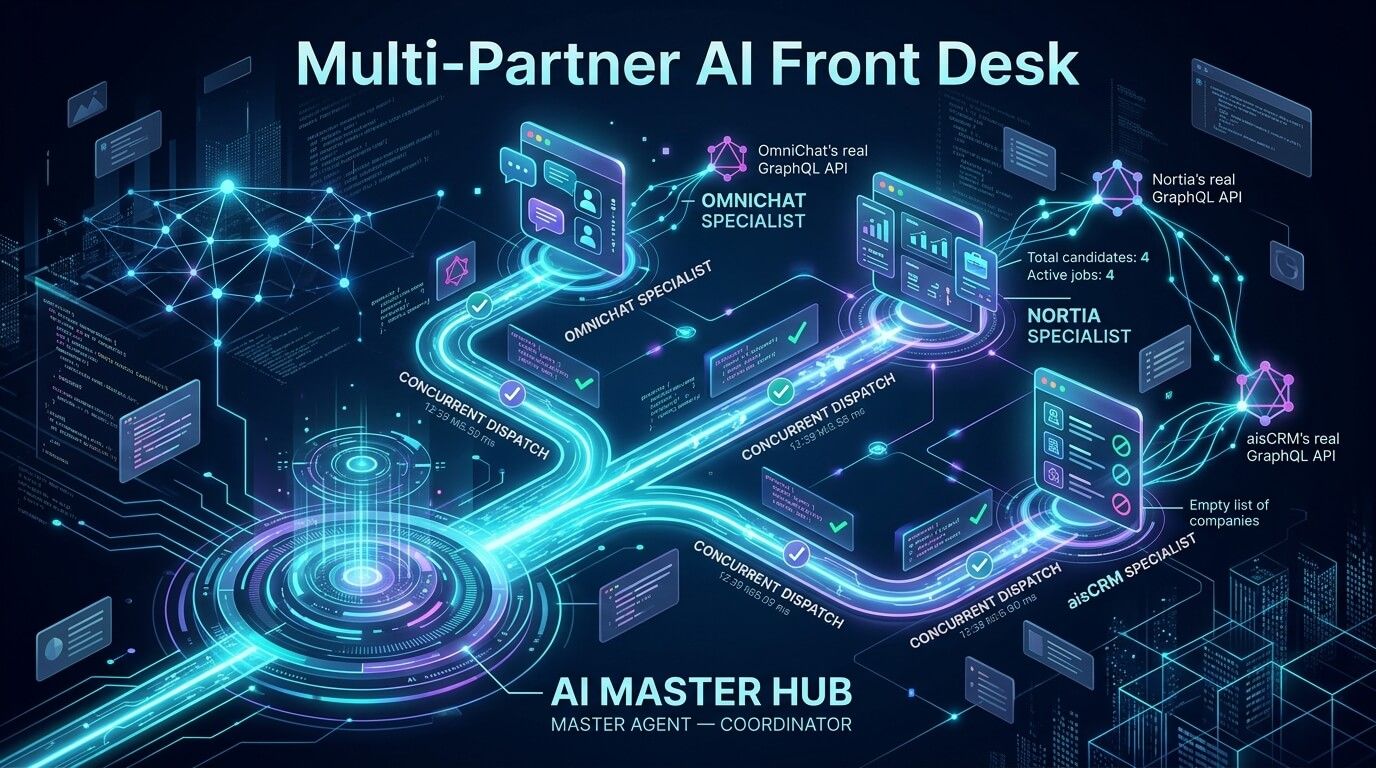
Everything below was verified live against a real deployment (aws-staging), with real ids, real timestamps, and real partner API responses — all three partners (OmniChat, Nortia, aisCRM) confirmed firing concurrently with genuine, non-hallucinated data. Where something took real engineering to get working — and one part of this did — this post says so plainly, including the code fix it needed.
The shape of the problem
Say you run a product like OmniChat, and you want your own customers to be able to ask an AI agent something that spans systems: “escalate my billing issue, and also tell me what’s going on with recruitment in Nortia.” Naively, that’s two integrations your team has to write, test, and maintain — one per partner schema — plus the orchestration logic to run them without one blocking the other, plus somewhere to keep the credentials.
Wetel’s answer splits into two independent mechanisms that happen to compose well:
SUB_AGENTdispatch (v2) — a workflow node type that hands a piece of a conversation off to one or more other agents, each running as its own independent, concurrent session.- The certified operation catalog — a set of GraphQL queries/mutations against partner APIs (OmniChat, Nortia, aisCRM today) that Wetel’s own team has already written, tested, and pinned against the partner’s real schema. A workflow author picks one from a dropdown; they never see or write the partner’s GraphQL directly.
Put together: a master agent dispatches to specialist agents concurrently, and each of those specialists calls a certified, pre-verified query against a real partner API — grounded, not hallucinated, data flowing back into the conversation. In the fully verified build below, all three specialists — OmniChat, Nortia, aisCRM — do this at once.
If you want the full reference for either mechanism rather than the narrative version below: the certified catalog’s conceptual model and raw GraphQL surface are documented at /docs/integrations/certified-operations, the click-through picker version lives on the action node’s own reference page, and the dispatch node’s full config surface is on the sub_agent node reference.
flowchart TB    User(["End user's message"]) --> Master
    subgraph Master["Master agent — Front Desk Coordinator"]        direction TB        MStart(["Start"]) --> MDispatch["SUB_AGENT node<br/>(v2, concurrent dispatch, 3 targets)"]        MDispatch --> MSum["LLM node<br/>aggregates all replies"]        MSum --> MResp["Response node"]    end
    MDispatch -.->|"dispatch, own session"| SubA    MDispatch -.->|"dispatch, own session"| SubB    MDispatch -.->|"dispatch, own session"| SubC
    subgraph SubA["Sub-agent A — OmniChat Specialist"]        direction TB        AStart(["Start"]) --> AFetch["ACTION node<br/>certified operation, SESSION_OMNICHAT"]        AFetch --> ALlm["LLM node<br/>reads the fetched JSON,<br/>grounded-only"]    end
    subgraph SubB["Sub-agent B — Nortia Specialist"]        direction TB        BStart(["Start"]) --> BFetch["ACTION node<br/>certified operation, NORTIA"]        BFetch --> BLlm["LLM node<br/>reads the fetched JSON,<br/>grounded-only"]    end
    subgraph SubC["Sub-agent C — aisCRM Specialist"]        direction TB        CStart(["Start"]) --> CFetch["ACTION node<br/>certified operation, SESSION_AISCRM"]        CFetch --> CLlm["LLM node<br/>reads the fetched JSON,<br/>grounded-only"]    end
    AFetch -->|"Wetel-verified GraphQL query,<br/>SESSION_OMNICHAT credential"| OmniChat[("OmniChat's real<br/>GraphQL API")]    BFetch -->|"Wetel-verified GraphQL query,<br/>NORTIA credential"| Nortia[("Nortia's real<br/>GraphQL API")]    CFetch -->|"Wetel-verified GraphQL query,<br/>SESSION_AISCRM credential"| Aiscrm[("aisCRM's real<br/>GraphQL API")]
    ALlm --> MDispatch    BLlm --> MDispatch    CLlm --> MDispatch    MResp --> UserOut(["Reply back to end user"])
The piece worth pausing on: the query text inside every one of those action nodes was not written by whoever built this workflow. Each is picked from the certified catalog — a dropdown, not a text box — and the exact GraphQL that runs is shown read-only before anything is saved.
Mirroring a routing pattern partners already ask for
This shape isn’t arbitrary — it mirrors a storyline OmniChat’s own team has requested for their human-agent workflows: Multi-Team Routing, where an incoming contact gets routed to the right team based on which shift is currently on. Same idea, applied one level up: instead of routing a contact to a human agent by shift, the Coordinator above routes a QUERY to the right AI specialist by TOPIC — a recruitment question goes to the Nortia specialist, a CRM/company question goes to the aisCRM specialist, a contact/chat question goes to the OmniChat specialist. It’s the identical “route to the right handler” shape, just AI-native instead of human-agent-native. If you already have a Multi-Team Routing workflow, this is the same pattern you already trust, extended to AI specialists that can pull real data while they’re at it.
SUB_AGENT v2 — concurrent dispatch, real config
Here’s the actual config a sub_agent node runs with, in the v2 shape:
{ "id": "n_dispatch", "type": "sub_agent", "config": { "targets": [ { "agentId": 29, "contextTemplate": "{{userMessage}}" }, { "agentId": 30, "contextTemplate": "{{userMessage}}" }, { "agentId": 32, "contextTemplate": "{{userMessage}}" } ], "resultVar": "specialistResults" }}Each entry in targets becomes its own independent session — not a sub-call inside the master’s own conversation history, a genuinely separate SessionEntity row with its own turn history, dispatched via Promise.allSettled so one target timing out or erroring never blocks or corrupts the others. resultVar always resolves to an array now (this is v2’s breaking change from v1): [{agentId, status, text}, ...], one entry per target, in target order.
One rule worth calling out explicitly if you’re wiring the aggregation step yourself: read it back as {{jsonString specialistResults}}, never a bare {{specialistResults}}. Handlebars has no auto-JSON-stringify — a raw object interpolated into a template renders the literal string [object Object], and the aggregating LLM will confidently answer based on that string rather than the real array. It’s a one-character-looking difference (add jsonString) with a real consequence, and it’s the same footgun documented in the Lark integration post for a single-agent workflow — it applies here too, just one layer up.
Proof of genuine concurrency, not just the word “concurrent”
“Concurrent” is an easy word to put in a spec and a much rarer thing to actually show evidence for. Here’s the real trace from a verified 3-partner run — one test message, all three specialists dispatched at once, read directly off each session’s own node timings:
sequenceDiagram    participant M as Master (session 744)    participant A as Sub-agent A (session 745)<br/>OmniChat Specialist    participant C as Sub-agent C (session 746)<br/>aisCRM Specialist    participant B as Sub-agent B (session 747)<br/>Nortia Specialist    participant O as OmniChat's real API    participant R as aisCRM's real API    participant N as Nortia's real API
    M->>A: dispatch (n_dispatch)    M->>C: dispatch (n_dispatch)    M->>B: dispatch (n_dispatch)    Note over A,B: all three sessions start within 31ms of each other
    activate A    A->>O: real GraphQL call (SESSION_OMNICHAT)    O-->>A: real contact data    activate C    C->>R: real GraphQL call (SESSION_AISCRM)    R-->>C: real (empty) company list    activate B    B->>N: real GraphQL call (NORTIA)    N-->>B: real dashboard stats + job postings    deactivate A    deactivate C    deactivate B
    A-->>M: reply, grounded in real OmniChat data    C-->>M: reply, grounded in real aisCRM data    B-->>M: reply, grounded in real Nortia data    M->>M: aggregate all three
All three child sessions’ fetch/LLM node windows overlap in the real execution trace — not sequential dispatch that happens to look fast, and not something you have to take on faith. Each child session is a real, independently queryable row, each ending in its own ENDED state with its own message history. The Coordinator’s aggregated reply for that run: “Open jobs at Nortia: 4 active positions… Companies in aisCRM: None — the database shows an empty list of companies… Contacts in OmniChat: 1 contact — [a real name, email, phone].” Every part of that is real — including the aisCRM leg, which genuinely queried and genuinely got zero rows back for that organization, rather than failing silently and being mistaken for one.
The certified operation catalog — how the gating actually works
Here’s the mechanism an engineer evaluating this will actually ask about: what stops a workflow author from just writing an arbitrary request body against a certified credential, and what happens if the picked operation doesn’t match the action’s credential source?
flowchart TD A["Workflow author picks a Custom Action<br/>in an ACTION node"] --> B{"Does that action's<br/>credentialSource have a<br/>matching catalog entry?"} B -- "No" --> C["No picker appears —<br/>author hand-writes argsTemplate<br/>as a full request body, same as before this feature"] B -- "Yes" --> D["Certified operation dropdown appears<br/>e.g. NORTIA -> 'Dashboard Stats & Job Postings'"] D --> E["Read-only preview:<br/>real, Wetel-verified query/mutation text"] E --> F["Arguments field relabels to 'Variables'"] F --> G["Runtime: executor checks<br/>operation.compatibleCredentialSources<br/>includes action.credentialSource"] G -- "mismatch" --> H["Throws: certified operation is<br/>not compatible with this action's credential source"] G -- "match" --> I["Runs the verified query,<br/>with the author's Variables substituted in"]The example above uses one operation — NORTIA’s “Dashboard Stats & Job Postings” — but the catalog isn’t limited to a handful of starter queries. As of this writing it holds 170 certified operations: 73 for Nortia, 59 for OmniChat, 38 for aisCRM, spanning near-complete read and write coverage of each partner’s real schema — contact/company/deal/task CRUD, conversation and pipeline management, candidate and job-posting lifecycle operations, automation and SLA configuration, and more. A workflow author picking from the dropdown today is choosing from a real, broad surface, not three example rows. Browsing the catalog needs nothing more than a signed-in Wetel user (plain AuthJwtGuard) — it’s not gated behind anything special. (Not every one of those 170 is live-execution-verified — a handful of Nortia’s newest hiring-pipeline mutations are schema-verified only, since there’s no disposable test fixture to round-trip against without touching a real candidate record; each operation’s own verificationNote says which class it’s in — see the certified operations reference for the full breakdown.)
The actual query text a workflow author sees for the Nortia operation, verbatim, is this — no schema knowledge required to pick it, no way to accidentally mistype a field name:
query { dashboardStats { total_candidates active_jobs } jobPostings { id title status department applications_count }}The action node config underneath, in full:
{ "id": "n_fetch", "type": "action", "config": { "customActionId": 4, "certifiedOperationId": 2, "argsTemplate": "{}", "outputVar": "nortiaData", "timeoutMs": 10000 }}Verified, real, non-hallucinated data
The point of all this is that the number that comes back is real. From the verified run, the action node’s own captured context (nortiaData) held:
{ "data": { "jobPostings": [ { "id": "8", "title": "Designer Lead", "status": "active" } ], "dashboardStats": { "active_jobs": 4, "total_candidates": 4 } }}And the specialist’s reply — “Total candidates: 4, active jobs: 4” — matched it exactly. As with the sub-agent aggregation step above, the LLM node reading this data must use {{jsonString nortiaData}}, not a bare {{nortiaData}}, or it renders as [object Object] and the model fills the gap with a plausible-sounding but fabricated answer instead of erroring. That’s the honest mechanism behind “how do you actually prevent hallucination here” — explicit engineering discipline in the template, not a property of the model that appears automatically.
What it actually took to get the third leg working
The Nortia leg (an admin-provisioned, Wetel-operated credential) worked the first time it was wired in. Getting OmniChat’s and aisCRM’s legs working — both use SESSION_OMNICHAT/SESSION_AISCRM, credentials resolved from an end user’s OWN sign-in rather than a shared service account — took a real code fix, not just configuration, and it’s worth explaining rather than glossing over.
The bug: a sub-agent dispatch creates a brand-new, independent session for each specialist — that’s the whole point, it’s how failure isolation and concurrency work. But that fresh child session started with no memory of the master session’s own signed-in identity at all. A SESSION_OMNICHAT/SESSION_AISCRM-credentialed action node checks “who is signed in to THIS session,” and for a freshly-dispatched child, the honest answer was always “nobody” — regardless of whether the master session had a real, linked identity. No crash, no visible error: the action node just declined and returned an empty result, which is exactly the kind of failure that’s easy to misdiagnose as “the partner API isn’t returning data” when the real cause is one layer up, in how the session was set up in the first place.
The fix: the dispatch step now explicitly carries the signed-in identity — and the downstream credential tied to it — from the master session onto each freshly-created child session, before that child’s own workflow starts running. It’s a small, targeted change with no effect on any workflow that doesn’t use session-scoped credentials inside a sub-agent dispatch.
A second wrinkle, smaller but also real: the identity used for testing has more than one organization on both OmniChat and aisCRM — genuinely ambiguous, and the platform correctly refuses to guess rather than picking silently. A one-shot sub-agent dispatch has no back-and-forth to ask “which organization did you mean,” so each specialist workflow got one extra step that pins a specific organization for this demo. Worth noting for anyone building something similar: this needed two attempts, because the first version of that “just emit this one fixed value” instruction got hijacked by the surrounding conversation’s real topic — a documented failure mode where a narrowly-scoped LLM step answers the conversation’s overall intent instead of its own specific instruction. Framing it explicitly as “you are not the assistant answering this question, ignore it entirely” is what made it reliable.
Update, since this post first published: the identity-linking half of the story above got materially simpler. At the time this was first verified, getting a single end user recognized across both OmniChat and aisCRM meant signing that identity into each product’s session-scoped credential separately. WebbyX One (Wetel’s shared identity layer) now supports linking several sibling products’ credentials in one sign-in submit — a caller’s sign-in widget calls webbyxOneProductClientIds to learn which products can be linked, fires WebbyX One’s own /sso/login once per product while the password is still in browser memory, and passes every resulting ticket into a single sdkVerifyWebbyxOneIdentity call via its productTickets argument. The result: one sign-in, not three, and every specialist dispatched off that session — OmniChat’s, aisCRM’s, and any future sibling product’s — resolves its SESSION_* credential from the same linked identity, with no separate per-product login step. (This is a different flow from loginWithWebbyxOne, which logs a person into the Wetel dashboard itself — see Login with WebbyX One for that variant; the session-level linking described here only authorizes a running session’s own workflow nodes to act as that end user, it never creates or logs into a Wetel account.) The org-ambiguity wrinkle above is unrelated and still applies — multi-product linking says who is signed in, not which organization to act as when that identity belongs to more than one.
isDeprecated/lastVerifiedAt exist on every catalog entry specifically so a query that changes shape gets flagged rather than silently breaking — but isDeprecated today is a soft flag, not a hard block. An already-published workflow using a deprecated operation keeps running; picking a newer, non-deprecated operation is the recommendation for new work, not an enforced rule.
Why route through Wetel instead of building point-to-point
If you’re an engineer at a partner company reading this and thinking “we could just write three GraphQL clients ourselves” — you could. Here’s the actual argument for not doing that, made without glossing over the parts above:
You don’t have to learn or maintain someone else’s schema. The certified catalog is Wetel’s own team’s verified, tested query text, pinned against each partner’s real, live schema — not a wrapper around “here’s a link to their docs.” Someone still has to own understanding a partner’s GraphQL shape, keep it in sync as it evolves, and handle its auth quirks forever. Wetel already carries that cost — and at 161 verified operations across three partners today, it’s a cost that’s actually been paid at real depth, not just claimed — with the deprecation-flagging mechanism above as the ongoing maintenance signal.
Concurrent, isolated specialist dispatch instead of one prompt trying to do everything. SUB_AGENT v2 means a master agent hands off distinct pieces of a conversation to independent sessions running at the same time, each with its own persona and its own failure isolation — one specialist timing out doesn’t block or corrupt the others, and that’s not an assertion, it’s the overlapping-timestamp evidence above. That’s a materially more debuggable architecture than a single system prompt juggling several integrations’ worth of context and tool definitions at once, and it’s the shape you’d likely reach for yourselves building a multi-specialist agent from scratch — minus the dispatch/aggregation/partial-failure machinery.
Your own end users’ credentials can flow through automatically, where a session-scoped variant exists. For OmniChat and aisCRM, SESSION_OMNICHAT/SESSION_AISCRM resolve from an end user’s own sign-in through Wetel’s identity layer, all the way down through a concurrent sub-agent dispatch — nobody has to hand over a shared service account or build a credential-rotation story on the partner’s side. And as of WebbyX One’s multi-product linking (see the update above), that sign-in only has to happen once per session to cover every linked product, not once per product. That’s a real reduction in what a partner has to build and own, not a marketing claim — it follows directly from how credential resolution actually works. (As stated above, Nortia doesn’t have this variant yet.)
If any of this is the difference between building a durable integration and rehearsing a demo, ask about the specific mechanics in this post before you commit engineering time to either side of the decision — including the parts that took real work to get right.
Related reference docs
- Certified Operations (OmniChat, Nortia, aisCRM) — the full catalog model, verification status, and GraphQL surface
- Action node reference — Certified operations — the dashboard picker, credential-source compatibility checks, and
NOT_SIGNED_IN/NOT_LINKED/NO_GRANT/NEEDS_ORG_CHOICEoutcomes - Sub-agent node reference — full
sub_agentv2 config, concurrent dispatch semantics,resultVarshape sdkVerifyWebbyxOneIdentityandwebbyxOneProductClientIds— session-level WebbyX One identity linking, includingproductTickets- Login with WebbyX One — the separate dashboard-login variant (not the session-linking flow used here)